
Latest version: 4.6.3 All versions: reqT reqT-lang
Latest reqT.jar from: tinyurl.com/get-reqT
curl -L https://tinyurl.com/get-reqT -o reqT.jar
reqT is a flexible and scalable open source requirements engineering tool for software developers and learners, available as a desktop application and a Scala library.
With reqT you can specify requirements using a simple requirements modelling language called reqT-lang with essential requirements engineering concepts, giving structure to natural language requirements, while enabling analysis, visualization and automation.
Visit the Quickref to explore requirements engineering concepts in reqT-lang.
The reqT-lang syntax is a small subset of Markdown using bullet lists with indentation and special keywords, to express textual requirements models by connecting entities via relations to attributes, as in this example:
* Feature: helloWorld has
  * Spec: Print a nice greeting.
  * Why: First step to get started.
Maintainer of reqT: Prof. Björn Regnell. reqT is used at Lund University in this course.
With reqT you can…
… using a simple markdown-based language in an open source tool and library.
Make sure you have Java
21 - LTS and Scala
3 installed for your specific system. Check this in terminal using:
java -versionscala -version (If
you use other versions you may get warnings, but things could work
anyway.)
Download reqT.jar
and double-click the downloaded file or run in terminal using:
java -jar reqT.jar
Learn more about using the reqT desktop app and using reqT with Scala.
Visit the reqT Quickref to learn about the concepts in reqT-lang.
Do the reqT Quiz to check your knowledge of requirements modelling concepts.
Do the reqT labs to learn about using reqT in Requirements Engineering:
Download reqT.jar
and start by double-click or open a terminal and navigate to the folder
with the downloaded file and type:
java -jar reqT.jar
The main window of the reqT desktop app has menus and three panes
as shown in the image below:
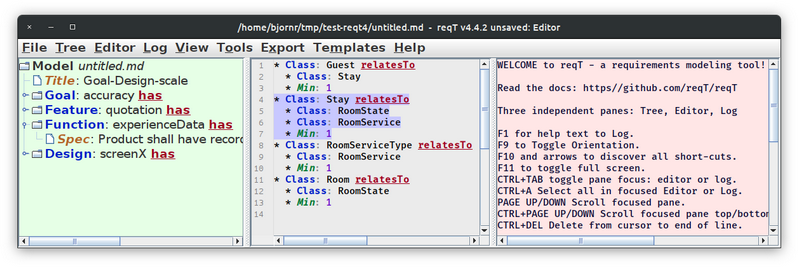
The left pane is called the Tree where your reqT model is shown as a hierarchy of (un)foldable and selectable nodes. The model is updated by the Tree menu. If you want to edit a selected Tree node then select Tree -> Edit Selected Node in Editor (Ctrl+E). The Tree is not updated until you explicitly issue an update, for example using Tree -> Replace Selected Node from Editor (Ctrl+R).
The middle pane is a text Editor with reqT-lang syntax highlighting and completion using Ctrl+Space. It can be manipulated using the Editor menu. Editing of model fragments is independent of the Tree pane. You can copy your edits into the Tree explicitly by using the Tree menu or the shortcuts shown in that menu.
The right pane contains the Log where help messages are printed. You can use the Log menu to change line wrapping, increase/decrease font size, and clear the log.
You can use the View menu to toggle pane orientation, fullscreen, window title, and increase/decrease the menu and tree font size.
You can use the Tools menu to apply different pre-defined tools to your model.
You can use the Export menu to save your model in different formats, such as html and LaTex. If you have GraphViz installed on your path, you can visualize your model as a nested or flat graph.
You can use the Template menu to enter example models into the editor.
You can use the Help menu to print help messages in the Log and see the current version of reqT using the About menu item.
java -jar reqT.jar repl You can
create a requirements Model in the scala repl like so:scala> val m = "* Feature: helloWorld has Spec: print greeting".toModel
val m: reqt.Model =
Model(Rel(Ent(Feature,helloWorld),Has,
Model(StrAttr(Spec,print greeting))))
scala> println(m.show)
Model(
Feature("helloWorld") has Spec("print greeting"),
)hello-reqt.scala
and run in terminal using: scala run hello-reqt.scala//> using scala 3.6.4
//> using dep "reqt:reqt:4.6.3,url=https://github.com/reqT/reqT/releases/download/v4.6.3/reqT-4.6.3.jar"
import reqt.*
val m = Model(
Feature("helloWorld").has(
Spec("Print a nice greeting."),
Why("First step to get started."),
)
)
@main def hello =
println(m.toMarkdown)Visit the reqT-lang api and source code
Visit the reqT app api and source code
help
argument:$ java -jar reqT.jar help
Welcome to reqT 4.6.3 https://reqT.github.io
Main program args:
<none> open a reqT window with empty model
edit f1 f2 for each file open a window with model from file
repl start the scala repl and do 'import reqt.*'
quiz start a quiz game in terminal
version print version, also -v --version
help print this message, also -h, --help
What is essential? – a pilot survey on views about the requirements metamodel of reqT, Björn Regnell, download pdf published at REFSQ2016.
Towards a Semi-Formal, Open and Scalable Requirements Modeling Tool, Björn Regnell, download pdf published at REFSQ2013.
A Scala Embedded DSL for Combinatorial Optimization in Software Requirements Engineering, Björn Regnell and Krzysztof Kuchcinski, download pdf published at First Workshop on Domain Specific Languages in Combinatorial Optimization (COSpeL’2013).
A Scala DSL for Constraint-based Requirement Engineering using JaCoP, Björn Regnell, download pdf presented at SweConsNet Workshop 2013.